For school IT leads and Data Protection / Designated Safeguarding Leads
Overview
Halved is an always available learning support system that brings expert guidance to every student at the exact moment they need it. This document describes what data Halved collects, where it is stored, how it is processed, and how it is protected. It is intended to support your school’s data protection assessment and due diligence process.
Student personal data is stored in the United Kingdom. Processing takes place in the United Kingdom, with one exception and three qualifications, each stated here rather than in a footnote, because a footnote does not cure a headline that has become untrue. The exception: AI inference for the chat function is performed by the Azure OpenAI Service in Microsoft Azure Sweden Central, a single European Union member state covered by UK adequacy regulations, on a regional deployment type that keeps processing within that region. Everything else remains in Azure UK South, including the description of the page a student is working on, the processing of documents a student or a teacher uploads, voice, handwriting recognition, content safety screening, safeguarding escalation, malware scanning and document conversion (section 3). The three qualifications: Microsoft’s abuse monitoring of the two Azure OpenAI resources, which may retain content flagged by automated checks for review by Microsoft staff, located in the European Economic Area for the Sweden Central resource and in a location Microsoft does not publish for the UK South resource (section 3); Microsoft Defender for Storage, which may share file metadata outside the region it scans in (section 8, and the Sub-processor Register); and Halved’s own administrative access to production, which is exercised by named officers of Halved Limited from the United Arab Emirates (sections 3 and 4). Each is set out where it arises.
Data Flow Diagram
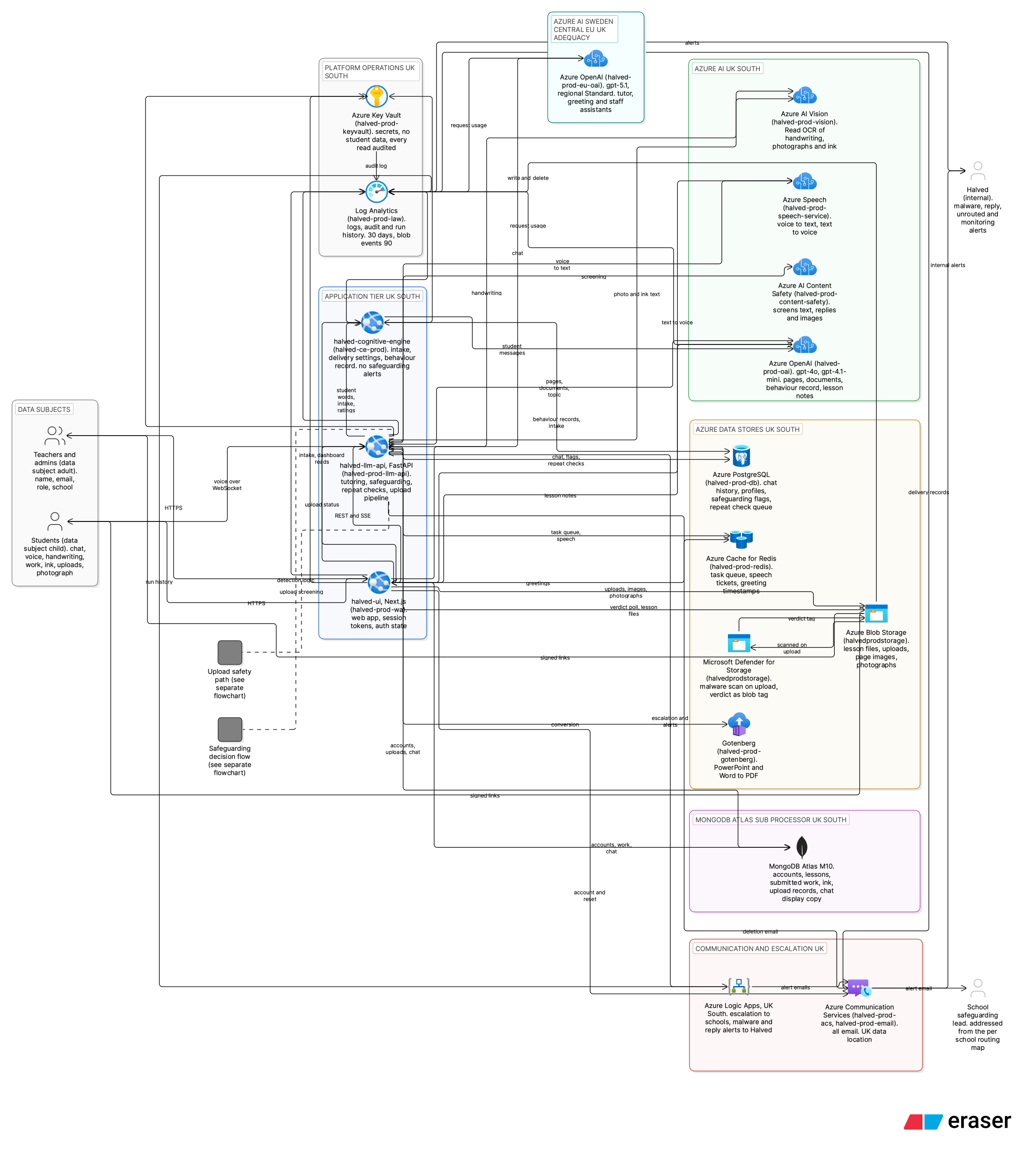
Full-size diagram: https://governance.halved.io/diagrams/Cloud_Architecture_Diagram.svg

The Halved platform architecture and data flow, showing how data moves from staff and students through the application tier to the Azure AI services and data stores. Every zone is in the United Kingdom except the Azure OpenAI resource that works out chat replies, which is in Azure Sweden Central. That route is the only one on which student data leaves the United Kingdom. The picture names each part and what passes between them; the sections below carry the detail.
Safeguarding Decision Flowchart
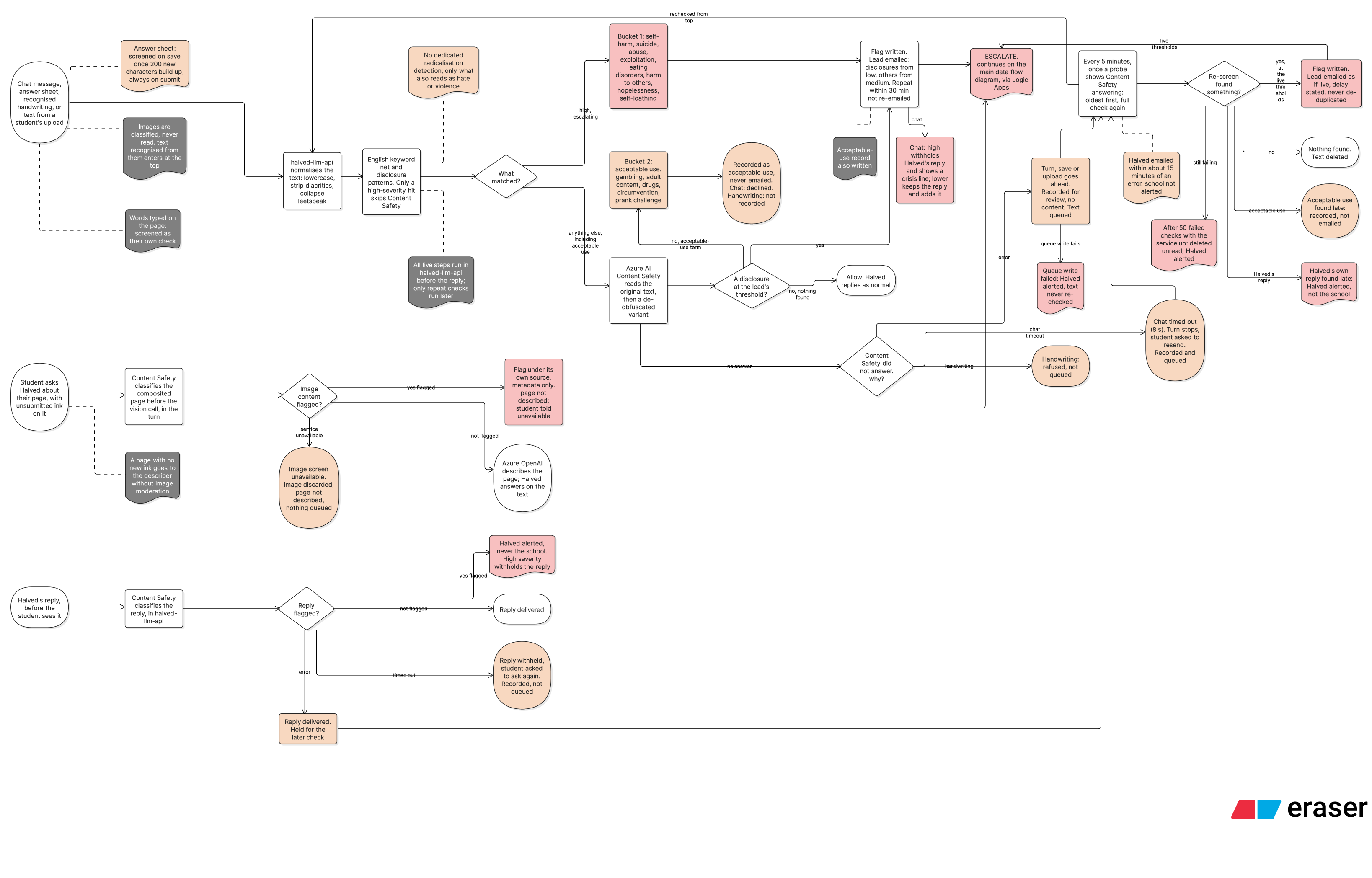
Full-size diagram: https://governance.halved.io/diagrams/Safeguarding_Decision_Flowchart.svg

How student text is checked, whether it is typed in chat, written into a piece of work, recognised from handwriting or extracted from an upload: keyword detection, then Azure AI Content Safety, then a division between a disclosure escalated to the school’s Designated Safeguarding Lead and an acceptable-use match that is recorded and, in chat, declined. The check runs as the text arrives, before the reply is sent, except where Content Safety cannot complete it; section 5, under “When a check cannot be completed”, sets out what happens then, including the repeat check that reads the text later.
Upload Safety Path
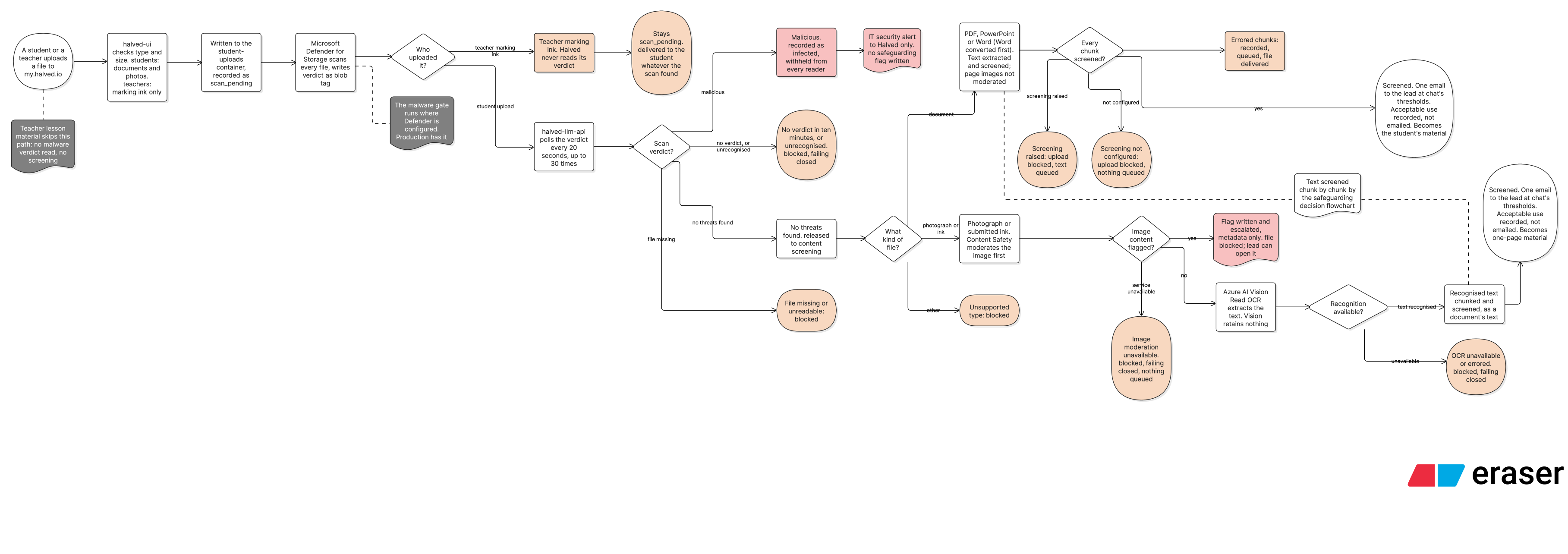
Full-size diagram: https://governance.halved.io/diagrams/Upload_Safety_Path.svg

What happens to a file after it is written to Blob storage: malware scanning by Microsoft Defender for Storage, the split between a student’s upload and a member of staff’s marking ink, polling for the scan verdict, content screening, text recognition, and the outcomes each path reaches, including when a screening service is unavailable. A teacher’s lesson material is uploaded by a different route and is not screened.
1. What data Halved holds about students
When a student account is created, Halved stores:
- A unique student identifier as the primary student record, and a school email address retained for authentication and account communications. Full student names are held by the school, not by Halved. By default a student’s first name is held for use in chat; schools may choose a no-names configuration in which even the first name is school-held.
The student identifier is a reference, not a credential. Knowing an identifier grants no access. All access is authenticated and scoped server-side to the authorised user and their school.
Roster ingestion. Student and staff records reach Halved in three ways: Halved imports a school’s roster from a spreadsheet; a school’s Halved lead can enter the school’s staff, classes and students at my.halved.io/intake, and Halved imports them; and a School Admin can create accounts directly in my.halved.io. Whichever way a record arrives, what Halved receives and retains differs by whether names are included. Without names: Halved receives identifiers and minimal account fields only; this is the default and the cleanest. With names: any full names received are stripped on receipt and not persisted on the Halved side, leaving only the identifier, email and, by default, first name. Halved never holds a student’s surname. Account creation is always performed by Halved or by a school’s staff; students do not self-register.
The school intake. Once a school’s data processing agreement is signed, Halved creates one account for the school’s Halved lead, and until Halved has imported the intake that account reaches nothing but the intake at my.halved.io/intake. The lead enters the school’s practical details and contacts, being its Halved lead, its safeguarding lead and safeguarding alerts mailbox, the person who covers that mailbox when the safeguarding lead is away, its deputy safeguarding lead, its data protection officer and its IT contact, each by name and email address; its staff, by name, school email address and role; its classes; and its students, each by school student identifier, school email address and year group, with a first name only where the school shares names, the classes the student is in, and, where the school holds them, a reading age with the date it was taken and whether the student is working at age expectation in English and in mathematics. There is no field for a surname and no free text about a student. What the lead enters is saved to Halved’s database in MongoDB Atlas (Azure UK South) as they type, and nothing is done with it until they send it. A Halved Admin reviews a sent intake, and each review is recorded, then imports it through the same functions as Halved’s own administration screens. The import creates every account without sending an invitation; invitations are sent separately, near the school’s start date. Where the school says its student email addresses receive no email, each student is instead given a first password, made at the moment the school’s lead opens it, shown to the lead once to hand out in person, and not stored or recorded anywhere; the student chooses their own password at first sign-in. The intake is deleted when it is imported, and otherwise 30 days after it was last changed. A record of who sent, returned, reviewed, imported or deleted it, and of who sent the invitations and opened the first passwords, is kept for the term of the school’s agreement; it holds account and school identifiers, times and counts, and nothing the intake contained.
-
Year group and subject assignments, set by the teacher.
-
Six items the school supplies about where a student is starting from and what support they need, each as a fixed choice. Three are measures the school already holds: a reading age, with the date it was taken, and whether the student is working at age expectation in English and in mathematics. The other three are the school’s three judgements of how the student manages particular kinds of task: what happens when they meet the words in a task, how many instructions they can hold at once, and how they respond to a longer piece of writing to read. For the pilot a Halved Admin enters them from the school’s own records, which include the school’s support plans for students who have one, and the school’s SENCO and School Admin can also enter and change them. They are recorded as the school states them and neither assessed nor inferred by Halved. None of the questions asks for SEND status, a diagnosis, a condition or a disability label, and there is no free-text field anywhere in the set. They are shown to the school’s SENCO and School Admin, and to a Halved Admin, and not to class teachers or to the student.
-
Assignment work, the written work the student produces within Halved.
-
Student-uploaded content, files and documents uploaded by the student. The file is stored, then queued for a malware scan at rest. Defender for Storage at the Standard tier, which performs active scanning and tagging, is active on the production environment and returns a verdict. A clean verdict releases the file to content screening, where keyword detection and Azure AI Content Safety scanning run on it; a file the scan finds malicious is withheld. No teacher surface lists or opens a student’s own upload: a student’s uploads are shown to that student. The one member of school staff who can open one is the school’s designated safeguarding lead, and only an upload that screening withheld and that raised a safeguarding flag, reached from that flag. Each such view is recorded.
-
Student-authored free-text notes. Stored and visible to authorised staff; not routed through the live safeguarding pipeline and not live-escalating. This is the remaining unscreened text surface on the platform, mitigated by staff visibility and point-of-use framing. Work-completion text is no longer part of this category: it is screened, and is described under “Answer-sheet text” below. Access defaults: submitted work is visible to the teacher who set the task, to the teachers of a class the student is in, and to the head teacher, SENCO, pastoral lead and safeguarding lead, and not to the School Admin; free-text notes are visible to the safeguarding lead and form tutor only; role terms are school-configurable.
-
Answer-sheet text, the text a student writes into a piece of work. Screened on two paths. While the student is drafting, screening runs against a record of how much of that draft has already been checked, so that only new text is sent, and it runs only once enough new writing has built up to be worth a check rather than on every save; a short addition is therefore not necessarily checked as it is typed. When the work is submitted, the whole sheet is screened in full and unconditionally, so anything the draft path passed over is checked then. A safeguarding disclosure written here raises a flag carrying its own source value and reaches the designated safeguarding lead by the same route as a disclosure typed in chat, while remaining distinguishable in the record from one typed in chat.
-
Jotter ink, a student’s own handwriting and drawing on the jotter, which is a blank surface the student works out on beside the lesson. The jotter also holds words a student types onto the page, held on the same record as that page’s ink and screened as text on save and again at hand-in. Before submission the ink is held as arrays of coloured strokes, each stroke recording which hand made it; at submission each worked-on page is flattened into a single image and delivered to the teacher with the work. A page is also composited while the student is still working, whenever they ask Halved about what is on it; that image is screened, described and discarded rather than stored, and is set out under “Seeing the page a student is working on” below. Submitted ink is content-screened, on the jotter and on a lesson slide alike, and a concern in it escalates; but the screening does not gate delivery, so the page is delivered whether or not the check has finished. It is set out in full under “Submitted student ink” below, together with staff-authored ink, on which no safeguarding check runs.
-
Working ink on a student’s own upload, the student’s handwriting and drawing on the pages of work they have uploaded themselves. It is held as arrays of coloured strokes, saved as the student works so that it survives a page turn, It cannot be submitted and is not delivered to a teacher. It does reach Halved at one point: when the student asks Halved about the page they are working on, the browser combines the page and the student’s current strokes into one picture and attaches it to that message, where it is screened by Azure AI Content Safety before the vision model is given it, is held for that call only and is not stored. It is keyed to the upload and to the rendering of it the student drew on, so a re-upload, being a new upload, starts with no ink. The student can erase it at any time, and deleting the upload deletes its ink, except where the upload was withheld by screening: that upload is soft-deleted and kept for staff review, and its ink is kept with it, although no staff surface displays upload ink. No ink can currently be drawn on a withheld upload, because an upload opens as pages only once it has passed screening, so that exception is guarded by the order of the upload pipeline rather than by a check of its own. Account erasure deletes this ink with the student’s other annotation drafts.
-
Chat conversation history, the text of conversations between the student and Halved’s learning support.
-
A learning profile, a background summary built by Halved from how the student interacts during tutoring, together with the fixed-choice answers the student gives about how they prefer to learn, how they approach their work, what they are interested in and whether they find particular kinds of task difficult, and the information the school supplies about where the student is starting from. It records learning behaviour, stated preferences and those school-supplied measures, such as topics covered, apparent strengths, areas of difficulty, preferred ways of learning, and recent engagement. It does not record any medical diagnosis, neurodevelopmental condition, or disability label, and that is enforced rather than intended: every field is passed through an automated vocabulary check before it is written, matching text is dropped rather than stored, and each drop is counted. This summary is used to personalise future sessions and is held within Microsoft Azure UK South. It is also read by school staff. Three routes do so today: the account of a student that Halved’s assistant gives a member of staff who asks about them, a teacher’s report about a student, and a summary prepared for a parents’ evening, which a teacher may read to a parent or carer. Each carries the same four elements and no more, being topics worked on, apparent strengths, areas of difficulty and the ways of learning that have helped, with the student’s own confidence rating after a recent task. Engagement notes and Halved’s internal observations about how a student works are withheld from all three. A fourth route, a teacher dashboard panel reading the same record, is built and switched off.
-
A communication register, a coarse value on a scale of 1 to 7 that sets the language Halved uses with the student, meaning vocabulary level and sentence complexity. It starts from the student’s year group and from the reading age and the answer about words in a task that the school supplies, and adjusts deterministically based on how the student responds during use. It is a setting for how Halved talks to the student rather than a judgement of the student: it is not itself a record of ability, attainment or reading age, and it records no diagnosis, disability or special-category data. It is held per student in the learning profile and is not shown to the student or to other students.
-
Three further delivery settings, derived from the items the school supplies, chiefly its three judgements, and held alongside the communication register. They are a length setting, which caps how long a reply may be; a chunk setting, which caps how many pieces a reply is delivered in; and an instruction setting, which caps how many steps a reply may ask the student to take at once. Each is a small whole number and each is a ceiling on what Halved asks of the student, never a floor. Like the register, they are settings for how Halved talks to the student rather than judgements of the student, they are not records of ability, attainment or reading age, and they record no diagnosis, disability or special-category data. They are not shown to the student or to other students.
-
A task-confidence self-assessment, where the student has chosen to give one: a number on a simple four-step scale recording how confident the student felt about a task. It is student-provided, separate from the learning behaviour Halved observes, carries no free text and no mood or wellbeing content, and is used to personalise support and to show teachers a trend over time.
-
Answers to fixed-choice questions about how the student prefers to learn, how they approach their work, what they are interested in, and whether they find particular kinds of task difficult. These are student-provided, chosen from options Halved sets, and carry no free text. They record a preference, a working approach, an interest or a stated difficulty with a kind of task only, and do not ask about health, disability, SEND status, a diagnosis or any other special category of data. Answering is optional, and on the difficulty question each kind of task is answered yes or no, with an item not answered recorded as unanswered rather than as no. Of the answers about how the student prefers to learn and how they approach their work, two change how Halved answers the student, being whether they like to know why they are learning something and what they usually do when stuck, unless the student has said Halved may not explain things a different way; the others are kept and change nothing. Those answers are not shown to school staff. The answers about interests and difficulties do not change how Halved answers the student. They are for the staff who teach the student, exactly as the student gave them, identified as the student’s own answers and not combined with anything Halved has inferred, and that view is built and not yet switched on. The staff who teach a student may give their own answers to the difficulty question about that student, kept separately and shown beside the student’s, never combined with them.
-
Activity records, a record of when the student was working in Halved and on which surface. Each record holds a start time and an end time, each held to the minute, the exact length of the period in seconds, the surface the student was on, and, where one is known, the session the activity belonged to. Because these are clock times, they cover whenever a student chooses to work, including evenings and weekends. This is set out in full under “Activity and time spent” below, including how the clock times and the length are held.
-
Sign-in records, a count of how many times the student signed in on each day. Each record holds the student identifier, the school identifier, the date and the count, and nothing else: no time of day, device, browser, network address or location. This is set out under “Staff activity and sign-in days” below.
-
Break-prompt answers, a record of each time the student answered a prompt in chat suggesting a break. The prompts appear to a student account after 30 and 45 minutes in chat, counted only while the chat is on screen, and then every hour; nothing is blocked, and work continues whichever answer is given. Each record holds the student identifier, the school identifier, the session, which prompt appeared (30, 45 or 60 minutes), the minutes the student’s browser had counted when it appeared, whether the student carried on or took a break, and the time the answer was recorded. No name is stored with it. It is held in Azure Database for PostgreSQL in Azure UK South. Through the platform it is shown to a member of staff with the Teacher role and to the designated safeguarding lead, each of whom sees every answer at their own school rather than only those of the students they teach, and to a Halved Admin for every school, as section 4 sets out. It has no retention period of its own: no scheduled job deletes it, and it is deleted when the student’s data is erased.
-
An optional profile photograph, uploaded by the student to their own account. No photograph is set at account creation and the platform functions without one. It is stored in Blob storage (UK South). It is shown to that student, and to staff at that student’s own school: the class teachers the student is linked to, and the school-wide roles the platform admits, being head teacher, SENCO, pastoral lead, designated safeguarding lead and School Admin. It is not shown to staff at any other school, and no Halved staff surface displays it. A photograph of a face is personal data. It is not biometric data: see below.
Halved does not collect:
-
Biometric data. A student may upload a photograph of themselves to their own account, and Halved holds that photograph, but it performs no facial recognition and no biometric matching on it and does not use it to identify anyone. A facial image becomes biometric data only when it is processed for the purpose of uniquely identifying a person, and Halved does not process it for that purpose.
-
Location data.
-
Device identifiers beyond a standard browser session.
-
Payment information.
2. Where data is stored
All data is stored within the Microsoft Azure UK South region (London datacentres), or on MongoDB Atlas hosted in Azure UK South. Halved stores no student personal data outside the United Kingdom. Two things Microsoft may hold or share are qualifications to that, and each is set out where it arises rather than here: content flagged by Microsoft’s abuse monitoring of the two Azure OpenAI resources, held in Sweden for the Sweden Central resource (section 3), and file metadata that Microsoft Defender for Storage may share outside the region it scans in (section 8).
| What | Storage technology | Location |
|---|---|---|
| Student accounts, lessons, assignments, submitted work, and the display copy of conversation messages shown in the interface | MongoDB Atlas | Azure UK South |
| Full chat conversation history as the authoritative turn-by-turn record, learning profiles derived from conversations, attainment records, activity records, staff activity records, sign-in records, break-prompt answers, and safeguarding flags | Azure Database for PostgreSQL | Azure UK South |
| Uploaded lesson files (PPTX, PDF) | Azure Blob Storage | Azure UK South |
| Student-uploaded files | Azure Blob Storage | Azure UK South |
| Student-authored free-text notes | MongoDB Atlas / Azure PostgreSQL | Azure UK South |
| Temporary cache, conversation context, rate limiting, and background task queue | Azure Cache for Redis | Azure UK South |
| Secrets and credentials | Azure Key Vault | Azure UK South |
| Text awaiting a repeat safety check, where the first check could not be completed | Azure Database for PostgreSQL | Azure UK South |
| Application and audit logs | Azure Log Analytics workspaces | Azure UK South |
All data is encrypted at rest. Secrets such as API keys, passwords, and encryption keys are stored in Azure Key Vault and never stored in plain text.
3. AI and voice processing
AI inference for the Halved learning support is performed by the Azure OpenAI Service from two Halved resources, in two regions.
Chat, in Sweden Central. Responses to a student’s messages are generated from Halved’s production resource in Microsoft Azure Sweden Central, running gpt-5.1 on Microsoft’s regional Standard deployment type, under which Microsoft processes prompts and completions only in that region. Sweden is a European Union member state covered by UK adequacy regulations, so no further transfer safeguard is required. This is the only route on which student data is processed outside the United Kingdom.
Everything else, in UK South. Halved’s production UK South Azure OpenAI resource is halved-prod-oai, which carries two model deployments, gpt-4o and gpt-4.1-mini. The development and demonstration environments each have a UK South account of their own and do not use production’s account or its key. Six routes run on it, each on the same regional Standard deployment type:
- Reading an uploaded document (gpt-4.1-mini): describing the pages of a document uploaded to the platform and reading the text on them, and deriving the aims, checkpoints and tasks of an uploaded lesson document.
- Estimating the topic a piece of material covers (gpt-4o).
- Keeping a student’s learning profile (gpt-4o, and gpt-4.1-mini for interests). This runs in the background, after a conversation rather than during one. Once ten of a student’s messages have built up, or after thirty minutes with no new message, the Cognitive Engine reads that conversation and rewrites the observed-behaviour profile described in section 1. After each turn it also reads the student’s message for interests they mention, which are used to choose examples. Both carry the student’s own words. A message Halved’s safety checks flagged is sent on neither.
- Writing a student’s to-do line (gpt-4.1-mini): the one-sentence instruction a student sees for a piece of work, written from what their teacher provided, being the title, topic, learning objective, assignment criteria, the teacher’s notes and up to the first 3,000 characters of an uploaded document. No student’s own writing is sent on this route. The line is stored, and it is not written again while those inputs are unchanged.
- Reformatting a teacher’s lesson notes (gpt-4o), where a student or a member of staff asks for the notes on a lesson to be tailored. What is sent is the teacher’s lesson note and the choice of how to tailor it. The student’s own writing is not sent on this route.
- Describing the page a student is working on (gpt-4o), which is set out under “Seeing the page a student is working on” below.
Voice processing is performed by the Azure Speech Service in UK South. Halved’s application data is stored in Azure UK South. Schools are told under the Data Processing Agreement before any of this processing moves to another region.
Microsoft’s abuse monitoring. Microsoft’s service-level abuse monitoring applies to both Azure OpenAI production resources, in Sweden Central and in UK South, and is at Microsoft’s default on each. Under that default, content flagged by Microsoft’s automated abuse detection may be retained by Microsoft for up to 30 days for review by authorised Microsoft staff. For the Sweden Central resource, Microsoft states that data at rest, including that store, is held in Sweden, and that its reviewers of content from resources deployed in the European Economic Area are located in the European Economic Area. For the UK South resource, Microsoft publishes no commitment that those reviewers are in the United Kingdom.
Halved applied on 12 September 2026 to Microsoft’s modified abuse monitoring programme, under which the storage is turned off. Microsoft’s responses to that application (reference 3796260) have been contradictory: one refused it on the ground that the programme is available only to managed customers working with a Microsoft account team, and a later message states that the reference relates to a quota request. Halved has asked Microsoft to confirm the position. Until it does, the storage is treated as enabled on both resources, and the resource configuration is consistent with that. Microsoft documents the ContentLogging property (in “Data, privacy, and security for Foundry Models sold by Azure”, under “How can a customer verify if data storage for abuse monitoring is off?”) as appearing with the value false only where the storage is turned off, and as not appearing at all otherwise. It was absent from the UK South resource’s capabilities list when read on 15 September 2026, and absent from the Sweden Central resource when read on 24 September 2026. Absence is not a confirmation that the storage is off, and is not read as one here. This is Microsoft’s own processing under the Microsoft Products and Services Data Protection Addendum. Schools will be notified under the Data Processing Agreement if the position changes.
Microsoft Agent 365 data collection. Every Azure AI services account used by the platform carries a Microsoft property, a365LoggingEnabled, which controls whether agent activity data is sent to Microsoft Agent 365. Those accounts are Azure OpenAI, Azure Speech, Azure AI Vision and Azure AI Content Safety accounts, across the production, development and demonstration environments. Read on 24 September 2026, a365LoggingEnabled is false on every one of them, and Microsoft’s read-only status property a365Status reports NotLicensed on every one. Halved sets the property to false on every account and enforces that setting with an Azure Policy at subscription scope.
The two readings are not the same kind of evidence, and this document does not present them as one. false is Halved’s own setting read back to Halved, so it confirms that the instruction is in place and nothing more. NotLicensed is Microsoft’s own report, but it is not a confirmation that collection is disabled: it states that no Agent 365 licence exists on the tenant, and it read the same way when the property was still true. The value that would confirm the setting has taken effect is Disabled, and Microsoft does not return it here. What Halved actually relies on is the licence and the consent, not the flag: Halved holds no Agent 365 licence and has given no tenant-level consent, which on Microsoft’s documentation means no data is collected regardless of the property. The flag and the Azure Policy stand behind that, so that a licence bought later does not turn collection on everywhere at once.
Administrative access to production. Administrative access to production systems is limited to two named officers of Halved Limited, as described in section 4, one of whom holds access for break-glass use only, and is exercised from the United Arab Emirates under named individual accounts, managed devices, multi-factor authentication, no local copies of student personal data, and access logging. Because those individuals act for Halved Limited, a company registered in England and Wales, this is not a transfer of personal data to another organisation and no transfer mechanism is required. It is stated here so that schools can see where those officers work from, and it is authorised as part of the school’s documented instructions under the Data Processing Agreement. No person acting for any other organisation holds standing administrative access. Halved cannot currently offer administration of a school’s tenant from within the United Kingdom only.
AI chat processing, Azure OpenAI (Sweden Central)
When a student sends a message to Halved’s learning support, that message, along with structured context about the lesson topic, assignment criteria, and the student’s learning profile, is transmitted to the Microsoft Azure OpenAI Service from Halved’s production resource in Microsoft Azure Sweden Central, running gpt-5.1 on Microsoft’s regional Standard deployment type, under which prompts and completions are processed only in that region. Sweden is a European Union member state covered by UK adequacy regulations, so no further transfer safeguard is required. This is the only route on which student data is processed outside the United Kingdom.
The chat function is three assistants, not one. One answers a student’s messages. A greeting assistant composes the opening line when a student arrives. A staff assistant answers a member of school staff. All three run on this route and in this region. The staff assistant is the one that carries the most about a named student: it is sent the member of staff’s own full name, and, where the member of staff is asking about a student or a class, up to 4,000 characters of observed-behaviour context about them, which names the students it covers. What that context may and may not contain is described in section 1.
What is sent on a student’s turn:
-
The student’s message text, exactly as typed.
-
The student’s first name, where the school has Halved hold one. A school may choose for Halved to hold no student name at all, and Halved then addresses the student without one.
-
Lesson notes and assignment criteria for the current task, the text of the slide or page the student is looking at, and the teacher’s speaker notes for that page.
-
Any words the student has typed onto the page in view.
-
Up to thirty turns of the recent conversation.
-
A summary of the student’s learning profile, expressed as observed learning behaviour (for example, that the student benefits from shorter explanations), and the guidance card derived from it.
-
The student’s own confidence rating for the task, where the student has given one.
-
A description, in text, of the page the student is working on, where the student asks about it and Halved looks. The picture itself does not go to Sweden: it is described in UK South and only the description travels on this route. This is set out under “Seeing the page a student is working on” below.
What is not sent on a student’s turn:
-
The student’s surname or email address. A student’s name is reduced to its first part before it is sent on this route.
-
Any image. No picture reaches the model that answers a student, on this route or any other; the page a student asks about is described in UK South and is sent on this route only as text.
-
Diagnoses or condition labels. Halved is configured so that diagnosis and condition labels are never written into the learning profile or transmitted to the AI service.
-
Submitted work from previous assignments.
-
Any data not directly relevant to the current tutoring session.
Help with spelling and grammar. A student who wants their spelling or grammar looked at asks Halved, and what they get back is Halved’s own reply on the chat route above. There is no separate spelling or grammar service, and a student’s work in progress is not sent anywhere for checking on its own.
Azure OpenAI Service is governed by the Microsoft Data Processing Addendum. Data sent via the Azure OpenAI API is not used by Microsoft to train foundation models, and Halved does not use student data to train third-party models.
Halved operates as a closed-loop tutoring system: it does not browse the internet and does not return public-search results.
Note: if a student types their name or personal details directly into the chat box, that text will be included in what is sent to Azure OpenAI in Sweden Central, because Halved processes the message as written. Students should be advised not to include personal information in chat messages.
Voice features, Azure Speech Service (UK South)
Halved supports optional voice features, both processed entirely within Azure UK South:
-
Speech to text, a student speaking their answer, processed via the Microsoft Azure Speech Service, UK South region.
-
Text to speech, Halved reading content aloud, using the Microsoft Azure Speech Service (voice: en-GB-AdaMultilingualNeural), UK South region.
Voice features are optional. If your school prefers to disable them, this can be requested.
Handwriting, annotation and images
Handwriting-to-text (input method). Student writes on a canvas in the browser -> the image is sent directly to Azure AI Vision (Read OCR, UK South) -> the recognised text is returned -> the image is discarded (held in memory for the duration of the call only; no write to Blob, database or logs) -> what happens to the recognised text depends on where the student is writing. On a piece of work, it passes Halved’s content-safety and safeguarding screening before it is inserted, and it is not inserted if the check finds a concern or cannot be made. In chat, it is placed in the message box for the student to send, and is then screened as a chat message: Halved’s web app stores the display copy of that message in the platform database before the AI backend screens it, so in chat the words are stored before they are checked, and are checked before Halved replies. The recognised text, not the ink, is what Halved reads. If handwriting cannot be read, Halved tells the student it cannot read it.
Submitted student ink (student work).
A student’s strokes are drawn either over the lesson slide or on a blank jotter page, held as arrays of coloured strokes with each stroke recording which hand made it, then flattened into a single image per page and uploaded to Halved’s Blob storage (container student-uploads, path scoped by school and user). A record is created in the platform database and referenced from the submitted work. This describes submission. A page is also composited before submission, on the path set out under “Seeing the page a student is working on” below, which stores nothing. On the production environment the page is queued for a malware scan and Defender for Storage returns a verdict. A clean verdict releases the page to content screening, so a safeguarding check does run on a student’s submitted ink and a concern in it raises a flag. Delivery remains a separate question from screening. The page is shown to the teacher on ownership of the upload, and one scan outcome withholds it and only one: a positive malware finding. A page whose content screening has not yet completed is therefore still delivered, so screening runs on a student’s submitted ink without gating it. Retained with the assignment record; no automatic expiry; removable by staff or by the student’s school through the deletion process.
This is the position on production. It is not observable on the development or demonstration environments, where the malware scan is skipped by design and the page goes straight to content screening, so neither environment exercises the path a school’s data actually takes.
Teacher annotations. While marking, a teacher’s marks are held as coordinates in the platform database. On confirmation, the marked-up slide is flattened into an image and stored in Blob storage in the same way. Retained with the assignment record as staff-authored feedback.
Staff-authored ink is a separate case from the one above rather than a degree of it, and it divides in a way worth stating precisely. Defender for Storage does scan it, because the scanner works on the storage account and a teacher’s marking is written to the same container by the same route as a student’s. What does not happen is anything on Halved’s side. The scan is queued for a student’s upload only, so Halved never reads the verdict on a staff-authored file, the record stays permanently in its initial pending state, and no safeguarding screening is ever attempted on it. An infected file written by a member of staff would be identified in Azure and delivered to the student anyway. The marked-up image is shown to the student by the same ownership decision that governs the student’s own ink. What stands in place of a safeguarding check here is the school’s own staff conduct and supervision arrangements.
Photographed work. The photograph is uploaded to Halved’s Blob storage first. Content moderation and then text recognition (Azure AI Vision Read, UK South) run against the stored file. The recognised text is screened. The photograph is retained as the image of that page of work; the screened text is the text of that page.
Seeing the page a student is working on. Halved can look at the page a student is viewing, on demand, when the student is talking about what is on it. The page is sent as a single image to a separate vision call on the Azure OpenAI Service in Azure UK South, running gpt-4o on Microsoft’s regional Standard deployment type, and not to the Sweden Central resource that serves the chat function. That call returns a factual description of what is there; the description is text, and it is treated as content to describe rather than as instructions to follow. Where the student has been drawing, the image is their current working, composited from the strokes they have made and not yet submitted, so this is the one path on which a student’s unsubmitted ink leaves the device. That image is screened by Azure AI Content Safety (UK South) before the describing call sees it, on the same footing as a photograph the student uploads. A flagged image is never described, and it is a safeguarding detection rather than only a refusal: it raises a flag under its own source value and escalates to the designated safeguarding lead. The flag carries the category and a fixed marker in place of any excerpt, so no part of the image and nothing read from it reaches the record. Nothing is stored on this path at all. The image is held in memory for the one call and discarded, no write to Blob, database or logs, so it creates no retention surface and there is nothing for a student or a school to delete afterwards. Where the page holds no new working, the stored image of that page is used instead, and it is not screened on this path. What was checked when it was stored depends on the page. A photograph the student uploaded was moderated as an image when it was uploaded. A page of a document the student uploaded had its text screened, but its images were not moderated. A page of a teacher’s lesson material was not screened at all.
Profile photograph.
This is not a piece of work and is handled on its own path. The account holder uploads a photograph of themselves. Before anything is stored, the image is sent to Azure AI Content Safety (UK South) for moderation. The path fails closed: a non-safe verdict, a timeout, or an unreachable scanner all reject the upload and delete the temporary file, so nothing is written to Blob storage unless a clean verdict was returned. A rejection on a non-safe verdict raises a safeguarding escalation to the school’s designated safeguarding lead, carrying the category and a fixed marker in place of any excerpt; no part of the image reaches that record, and the image itself is not retained. A clean image is written to Blob storage (container uploads, UK South) under a server-generated name, and the account record holds a pointer to it. Public access is disabled on the storage account, so the file is served only through a short-lived read-only signed link, minted server-side and only for a caller the platform has authorised to see that photograph. No text recognition runs on it and it is not sent to the AI that answers students.
What the sub-processors hold. Azure AI Vision receives an image, returns text, and retains nothing. The vision call that describes a page a student is working on, and the content-safety check that screens that image before it, each likewise receive an image and retain nothing. Halved’s own retention of images (submitted annotations, submitted jotter pages, teacher annotations, photographs) is described above and is governed by the Data Retention Policy.
Teacher-to-student messaging
A teacher composes a message and selects an audience (an individual student, a class, or a group). The message is stored in the platform database with the sender, the recipients and a timestamp, and is shown to the recipient student in the platform. Teachers can edit or recall a message they have sent.
Messages are staff-authored content. They are not passed to the AI that answers students as context, and they do not contribute to the AI learning profile.
Messages are automatically deleted 7 days after they are sent.
Attainment and progress
Three sources feed the attainment record:
Teacher marks. A teacher records a score against a piece of work (a score and a total). This is entered by the teacher, not generated by Halved.
Code-judged answer correctness. Where a student answers a question that can be checked deterministically (the answer is either right or it is not), Halved records the outcome of that check. This is a record of a code-evaluated result. An AI model’s opinion never enters the attainment record. Where correctness cannot be determined by a straightforward check, no attainment record is created.
Time in productive difficulty. Halved records how long a student spends working on a task that is appropriately stretching for them (as opposed to breezing through it, or being stuck). This is a task-fit signal, used to tell a teacher whether the work is pitched right.
Where a student reworks a piece of work after support from Halved, the change between the first attempt and the reworked attempt is recorded. This change is the only element Halved attributes to its own support.
The attainment record is surfaced to the student’s teachers and to the student as a trend. It is not used for ranking, comparison between students, or any automated decision about a student. It does not feed any inference about ability, SEND, or developmental stage.
Activity and time spent
What the record is. Halved holds a table of student activity intervals. One row records that a named student was active from a start time to an end time on one surface. Each row holds the student identifier, the school identifier, an optional session identifier, the surface, the start time and the end time, the length of the interval in seconds, and the time the row was created. The start time, the end time and the creation time are full timestamps with a time zone, each truncated to the minute. The length is computed before that truncation and stored exactly, in seconds, so the duration of an interval survives at full precision while the clock times do not. The truncation is enforced by the database as a constraint on each of the three timestamps, rather than by the code that writes them, so a later endpoint or a direct insert cannot store a finer time.
The surface value is one of six: chat, work-completion, lesson-content, lesson-notes, homepage, or unknown. The two lesson surfaces are deliberately separate: lesson-content is the lesson page a student reads or works through, and lesson-notes is the list page they browse to reach it, so that time spent choosing what to open is recorded as navigation rather than counted as time spent studying. “Unknown” is a real stored value, used where the surface could not be determined. The session identifier can also be absent. A row with no session and a surface of unknown attributes a period of time to a named student with no further context about what they were doing.
What it does not hold. No message content, no work content, no location, no device or browser identifier, and no inference about the student. It is a record of clock time and surface only.
Out-of-hours activity. Because these are clock times, the record covers whenever a student chooses to work, including evenings, weekends and school holidays. Halved does not restrict when a student may use the platform, so the record follows the student’s own choice of working time.
What it is for. Three outputs are produced: the total time a student has spent working, the proportion of that time spent with Halved’s support, and a distribution showing when in the day a student works. These are for the student’s teachers, and for the student’s own view of their own record.
What is built. Recording, the teacher measures and the student’s own view of the record are built and were released as a single change. Recording of a student’s activity begins in a given environment of the platform when that release is deployed there, and where it has not been deployed no activity record exists.
How the measurement is bounded. This table holds student accounts only. Staff activity is recorded by the same timer into a separate table, described under “Staff activity and sign-in days” below, so no staff time can enter a figure about a student. An interval ends at the last interaction actually observed, not at the later point the platform notices the student has stopped, and the same rule applies when the browser tab is hidden, since a student may have walked away before that happened. The measure is therefore conservative by construction: it can under-report a student who sits still, and cannot over-report anyone. For a figure shown to a teacher about a child, and to that child about themselves, that is the direction in which to err.
Who sees it. The student dashboard shows a student their own activity record, including a version of the when-in-the-day view, so that a student can see what is held about their own working time. Halved committed to the order: the timer that creates activity records ships with the student view, not before it. That commitment was met, the two having been released together, so there is no build in which a student’s working time is recorded while the student has no way to see it.
Retention. A maximum of 12 months from the start time of the interval, purged by a scheduled job, and in any event deleted on contract end plus 90 days, as set out in the Data Retention Policy.
Staff activity and sign-in days
Why they exist. For pilot reporting, which is reporting how the platform is being used during a school’s pilot, Halved records each sign-in by a student or a member of staff, and records staff activity as it already records student activity. The report gives, for each person in one school, the number of sign-ins, the number of different days on which they signed in, the total active time, the number of sessions and when they were last active. Decided by Halved on 30 September 2026.
Staff activity. A separate table of staff activity intervals, written by the same timer as a student’s and under the same rules: a start time and an end time, each truncated to the minute and held to the minute by a database constraint, the length of the interval computed before that truncation and stored exactly in seconds, the surface, and the time the row was created. An interval ends after five minutes without any typing, scrolling, pointer movement or touch, when the member of staff moves to another page, or when the tab is hidden. Each row holds the staff identifier and the school identifier. It holds no session identifier and no record of which piece of work was open, and no message content, work content, location, device or browser identifier. The table is separate from the student table so that no staff time can enter a figure about a student, and the service refuses to file a student account’s time in it.
Sign-in days. One row per person per day, holding the school identifier, the user identifier (a student or a member of staff), the date, the time zone the date is on, and the number of sign-ins that day. There is no time of day anywhere in the row, and no device, browser, network address or location. The date is computed by the service from its own clock at the moment of sign-in, in the school’s own time zone where the school has chosen one for Halved, and in Coordinated Universal Time where it has not; the row records which. Nothing about the sign-in is sent from the browser except that it happened and who it was.
Sessions. A session is not stored. The report counts a new session wherever an interval starts more than five minutes after the latest end before it, which is the same five minutes that ends an interval. Because the clock times are held to the minute, a pause within a minute of five minutes can fall either side.
Who sees it. A Halved Admin, through an administration screen available to the Halved Admin role only. The records are not shown to school staff, to students, or to any other school. Halved uses them to report on use of the platform, not to assess any person’s work.
When it is switched on. Both records are switched on in an environment of the platform by a deliberate setting, which is on in Halved’s development environment only and was not switched on in any environment schools use before this summary, the Privacy Policy and the DPIA Support Pack described them.
Retention. A maximum of 12 months, purged by two scheduled jobs: staff activity from the start time of the interval, and sign-in records from their date. In any event both are deleted on contract end plus 90 days, as set out in the Data Retention Policy. A student’s sign-in records are deleted with the rest of that student’s data by the erasure process. Staff records are not reached by the student erasure, and there is no automated route for erasing a staff account’s records on request: the 12-month purge is their only automatic removal, and a member of staff’s request is handled by Halved directly.
4. How access is controlled
Students and teachers log in with an email address and password.
-
Passwords are stored using bcrypt hashing and are never stored or transmitted in plain text.
-
Sessions use encrypted JSON Web Tokens with a seven-day expiry.
-
Communication between Halved’s web app and AI backend uses an internal API key, not exposed to the browser.
-
Teacher accounts and student accounts are role-separated. A teacher or class teacher can view only the work of students they teach: work set on a lesson they authored, or the work of a student in a class they lead. The head teacher, SENCO, pastoral lead and safeguarding lead can view every student’s work in their own school, and the School Admin cannot. Only the member of staff who authored a lesson can mark the work set on it.
-
School staff can read a student’s conversations with Halved in two places. The student’s whole conversation history, from the student’s page on the teacher dashboard, can be read by the members of staff the student is linked to through a class and by the school-wide roles a school has configured, as the Privacy Policy sets out under “Who can see a student’s data”. The conversation about one piece of submitted work, beside that work while it is being marked, can be opened only by the teacher who set the work. A teacher linked to a student only by work they have set reaches the second and not the first. In both, a message that Halved’s safety checks flagged, and Halved’s reply to it, are withheld from every member of staff except the designated safeguarding lead; if the flags cannot be read from the AI backend when a conversation is opened, the conversation is refused rather than shown unfiltered, and no audit row is written for the refusal. Each read is recorded. An audit row is written to the AI backend naming the member of staff, the student, the day and which of the two was read. A row that cannot be written at the moment of the read, because the AI backend is not answering, is queued and written once it answers; it is not dropped.
-
Halved Admin access is separately controlled and limited to Halved staff. It is not school-scoped: the session runs unscoped across school tenants, and the per-student roster check short-circuits for that role, so a holder can read a named student’s account record and safeguarding flags in any school, and the usage report, which gives for each student and member of staff of a chosen school their sign-in count, sign-in days and last sign-in day, and their recorded active time, sessions and last activity. It also reads every school’s break-prompt answers at once: for each answer, the school, the student’s identifier and, where the AI backend holds one, their first name, the session, which prompt fired (30, 45 or 60 minutes), the minutes the student’s browser reported, whether the student continued or took a break, and when. It is narrower than the section 1 list. Every teacher-dashboard route refuses this role, the learner profile, attainment, activity, chat history and the conversation around a safeguarding flag among them, because each requires a school in the caller’s tenant context and this role’s session carries none. Halved’s assistant for staff builds a school context from the account’s own record instead, so for this role it reaches a named student’s learning profile only in the school recorded on that account. A holder reaches a conversation only through the marking view, on a lesson their own account authored, where a flagged message and Halved’s reply to it are withheld as they are from school staff and the read is audited. The routes that list a student’s assignments and open a submitted piece of work refuse this role, and marking, a student’s uploaded files and a jotter page are scoped to the authoring or owning member of staff, so a holder reaches a submitted piece of work only on a lesson their own account authored. Most of these reads write a per-student audit row to the AI backend recording the reader, the student, the time and a reason, including the safeguarding flag list, which writes one for each student it shows, and the flags raised in one conversation; the account-record fetch, the usage report and the break-prompt answers do not, and are named here rather than covered by a general claim. Beneath the application, break-glass Microsoft Azure and MongoDB Atlas owner accounts reach the stored data directly; those are recorded in Halved’s internal admin account register and are logged by Microsoft and MongoDB rather than by Halved. This is deliberate, because Halved Admins operate, support and troubleshoot the platform across every tenant, and its load-bearing control is who holds such an account. That access is exercised from the United Arab Emirates rather than from within the United Kingdom. Because the individuals who hold it act for Halved Limited, it is not a transfer of personal data to another organisation; it is set out in section 3. Every other role, including the designated safeguarding lead, is school-scoped.
5. Safeguarding
Halved includes a live safeguarding pipeline operating across all environments. Student messages are checked as they are sent, before Halved replies; where a check cannot be completed, what happens instead is set out under “When a check cannot be completed” at the end of this section. Where a welfare concern is detected, the concern is logged and an alert is sent to the school’s nominated safeguarding lead or leads. Lower-severity concerns are flagged and escalated without interrupting the student’s session. Higher-severity concerns return appropriate support information to the student and are escalated immediately.
Those sentences describe what happens once a concern has been detected. What the checks do and do not detect is the two paragraphs that follow, and this section is not to be read without them.
What the checks detect, and in what language. A check runs in two stages: a fixed list of terms, and behind it Azure AI Content Safety, which reads the text for harmful content. The list of terms is English. It holds no term in any other language, and nothing translates or transliterates what a student writes before the comparison is made. That matters more than it may first appear, because Content Safety has no category for a child disclosing that they are being abused, neglected or exploited: it scores whether text is harmful content, not whether a child is describing harm being done to them. For those categories the English term list is the whole of the detection, so a disclosure of abuse, neglect or exploitation written in another language is not detected and no alert is raised. Content Safety does work in other languages for self-harm, suicide, sexual content and violence, and a concern it detects there is logged and does reach the school’s safeguarding lead.
The response that interrupts the student is narrower still, and it is narrower in every language, English included. Stopping Halved’s reply and returning support information to the student happens at the highest severity only, and measurement on 10 September 2026 found that severity returned only where a term from the list had matched. So a student writing about being at risk in words that are not on that list, in English or in any other language, may raise an alert to the safeguarding lead through Content Safety while receiving an ordinary reply from Halved on the screen in front of them. Halved is lowering the severity at which the reply is stopped, and is adding terms in other languages to the list. Neither is in place at the date of this version, and a school should read this section as it stands rather than as it is intended to stand. A school whose students may write about their welfare in a language other than English should treat that as a matter for its own safeguarding arrangements and not as one this pipeline covers.
The safeguarding pipeline uses Azure AI Content Safety and Azure Logic Apps, both hosted in Azure UK South and covered by the Microsoft Data Processing Addendum. Safeguarding alert content, including a short excerpt of the flagged message, is sent to the school’s nominated safeguarding contacts by email through Azure Communication Services (United Kingdom).
Student-uploaded content is screened through the same safeguarding pipeline as chat messages: keyword detection runs first, followed by Azure AI Content Safety scanning (UK South). A malware-at-rest gate (Defender for Storage) applies to a student’s uploaded files; the Standard tier is active on the production environment. Defender scans every file written to the storage account, staff-authored images included, but Halved reads the verdict and acts on it only for a student’s upload.
Student-authored free-text notes are not routed through the live safeguarding pipeline and do not trigger live escalation. This is the remaining unscreened text surface on the platform; the safeguarding mitigation is staff visibility and point-of-use framing.
Submitted ink divides into two classes on production, and they do not behave alike. A student’s ink, on a lesson slide or a jotter page, is queued for a malware scan; Defender for Storage returns a verdict, and a clean verdict releases the page to safeguarding screening, so a concern in a student’s submitted ink raises a flag. A teacher’s marking ink is scanned by Defender in the same way, because the scanner works on the storage account rather than on what Halved asks it to look at, but it is never queued on Halved’s side, so no verdict is read and no safeguarding screening is attempted. In both cases the image is shown to the person it was sent to, because delivery is decided on ownership of the upload. One scan outcome withholds a student’s image and only one: a positive malware finding. So a student’s ink is screened but is not gated on that screening, and a teacher’s ink is scanned but nothing acts on the result.
So a concern drawn, or written by hand, into a student’s submitted work raises a flag and reaches the safeguarding lead, although the work still reaches the teacher while that is happening. For a teacher’s ink there is no automated safeguarding mitigation at all, and the school’s own staff conduct and supervision arrangements stand in its place.
Text Halved reads from handwriting a student is using as a way of typing is screened and does escalate. That is a different path from ink submitted as part of work. On a piece of work, the recognised text is screened before it is inserted, where a student’s submitted ink is screened but is delivered without waiting for the result. In chat, the recognised text becomes an ordinary chat message, and like every chat message its display copy is stored by Halved’s web app before the AI backend screens it and Halved replies.
Answer-sheet text is screened and does escalate. A student’s written work is checked while it is being drafted and again, in full and unconditionally, when it is submitted, and a disclosure written there reaches the designated safeguarding lead by the same route as a disclosure typed in chat. The draft check is opportunistic rather than continuous: it runs on new writing once enough of it has built up, so a short addition may not be checked until the work is submitted. Submission is what guarantees the whole sheet is screened. The record keeps these apart, so a lead can see whether a child typed it in chat or wrote it in a piece of schoolwork a teacher may already have read. Text Halved reads from a student’s handwriting is screened and escalates on the same footing.
What is not screened, stated together rather than left to be inferred from the paths above. A student’s ink is autosaved as an unsubmitted draft while they work, and that draft is not screened while it sits there: the three screening points are submission, handwriting recognised into text, and the composite Halved looks at. Words a student TYPES onto a page are screened on a fourth point that ink does not have: as text, on each save that adds words the page did not already hold, and again at hand-in. That screen records and escalates, never blocks, and says nothing to the student. It exists because image moderation does not read sentences, so a disclosure typed in a font would pass the composite check that a drawn one would not. The title a student gives an upload, and the original filename of the file, are stored as supplied and are not screened, although the file’s contents are. Student-authored free-text notes are not screened, as stated above.
A student’s working ink is a third source that reaches the designated safeguarding lead, alongside a chat message and the text of a piece of work. When Halved looks at the page a student is working on, the composited image is screened before it is described, and a flagged image raises a flag under its own source value and escalates. It is distinguishable in the record from the other two, and from the same student’s ink screened later at submission, which is a separate event on a separate path. The flag holds the category and a fixed marker in place of an excerpt, so a lead is told that something was drawn and what kind of concern it raises, and is not shown the drawing.
When a check cannot be completed
A check can fail to complete in two ways, and Halved treats them differently.
The safety service returns an error. The student is not blocked: the chat message goes to Halved, the piece of work is saved and the upload is delivered. (If the screening of an upload fails outright rather than returning an error, the upload is withheld instead, and its text is still held for the later check.) The failure is recorded for human review, in a record that holds no message content. Separately, the text that was not checked is held so that it can be checked later, in Halved’s database in Azure UK South. Every five minutes Halved first confirms that the safety service is answering again and then checks the held text, oldest first. Each held item is deleted as soon as it has been checked, whatever the check finds. A concern found in a student’s words at this later check is flagged and escalated to the school’s designated safeguarding lead exactly as it would have been if the check had completed at the time, at the same thresholds, and the alert says that the check was delayed and by how long. Because a late alert is the first time anyone has been told about that message, it is not merged with other recent alerts about the same student, so a school may receive several alerts together when held text is cleared after an outage.
A chat message whose check takes too long. The turn stops instead: the message does not go to Halved, and the student is told that something went wrong and asked to send it again. The message is still recorded for human review and held for the same later check, so a student who does not send it again still has it checked.
Halved’s own reply. If the check of a reply returns an error, the reply is shown to the student and is held and checked later in the same way. A concern found then alerts Halved, not the school, because the words are Halved’s and not the student’s, and a later check cannot withdraw a reply the student has already read. If the check of a reply takes too long, the reply is withheld and the student is asked to ask again.
What the later check does not cover. A later check is late: a student whose message could not be checked will usually have received an ordinary reply from Halved before it is read. An image whose moderation cannot be completed is not held, because only text is held: a photograph a student uploads is blocked instead, and a page Halved was asked to look at is not described. Handwriting a student is turning into text is not held either: if its check cannot be completed, the recognised text is not added, the student is told that the note could not be added right now, and nothing is checked later. If held text has failed its check fifty times while the safety service is otherwise answering, which takes more than four hours, it is deleted unread and Halved is alerted; and if the text cannot be held at all, because the write to the database fails, Halved is alerted and the text is not checked later. In both cases the school is not alerted automatically.
6. Data security summary
| Control | Status |
|---|---|
| Encryption at rest | Yes, all Azure storage |
| Encryption in transit | Yes, HTTPS/TLS throughout |
| Secrets management | Azure Key Vault |
| Password storage | bcrypt hashed |
| Role-based access control | Yes, eight school roles plus Halved Admin |
| UK data residency (storage) | Yes, Azure UK South and MongoDB Atlas Azure UK South |
| Data residency (processing) | Chat AI inference in Azure Sweden Central (EU, covered by UK adequacy regulations); all other AI inference, voice and platform processing in Azure UK South; subject to the three qualifications stated in the Overview |
7. Data retention and deletion
Halved retains student personal data for the duration of the school’s contract. Following termination of services, general personal data is securely deleted within 90 days, unless Halved is required to retain it for longer to comply with legal, accounting, or regulatory requirements.
Safeguarding records are treated differently. Where a safeguarding concern has been recorded, the associated record is retained in line with statutory safeguarding guidance (Keeping Children Safe in Education) and the school’s own retention schedule, which is typically up to seven years. This applies regardless of the general deletion timeline above.
Requests for deletion of an individual student’s data during the contract period (the right to erasure under UK GDPR) should be directed to dataprivacy@halved.io. Halved will action these requests without undue delay and in any event within one month of receipt, extendable by up to two further months for complex or numerous requests. Where a record is subject to a statutory safeguarding obligation, Halved may retain it to the extent required by law. The school, as controller, determines the retention and erasure of safeguarding records, as set out in the Data Processing Agreement and aligned to the school’s safeguarding retention schedule and Keeping Children Safe in Education.
In some circumstances, Halved may anonymise personal data so that it can no longer be associated with any individual. Anonymised data may be retained indefinitely and used to improve the platform.
8. Third-party services and sub-processors
Every third-party service used by Halved is deployed in the United Kingdom, except the Azure OpenAI resource that serves the chat function, which is deployed in Sweden Central; each is covered by a Data Processing Agreement. Two of them do not keep all processing within their region, and both are stated in the table rather than left to a reader: Microsoft’s abuse monitoring of the two Azure OpenAI resources, and file metadata that Microsoft Defender for Storage may share outside the region it scans in. The table below is a summary; the full Sub-processor Register, which adds the parent entity, the DPA relied on and the status of each, is published alongside this document as sub-processor-register.md.
This section counts third-party services. Halved’s own administrative access to production is not a third-party service and is not counted here, which is why the Overview of this document names three parts of the service that are not wholly contained in the United Kingdom and this section names two. The third is that administrative access, and it is set out in sections 3 and 4.
| Service | Purpose | Location | Student data involved | DPA |
|---|---|---|---|---|
| Microsoft Azure (App Service, PostgreSQL, Redis, Blob, Key Vault, Log Analytics) | Application hosting, primary data storage, secrets management | UK South | All student and teacher data | Microsoft DPA |
| Azure OpenAI Service (Sweden Central resource) | AI learning support chat responses (gpt-5.1, regional Standard) | Sweden Central (Sweden, EU; covered by UK adequacy regulations), subject to Microsoft’s abuse monitoring (section 3) | Chat messages, the student’s first name, lesson and page context, conversation history, learning profile summary | Microsoft DPA |
| Azure OpenAI Service (UK South resource) | Reading an uploaded document and deriving its aims, checkpoints and tasks, writing a student’s to-do line from their teacher’s material, and reading a student’s messages for interests they mention (gpt-4.1-mini); estimating the topic a piece of material covers, rewriting a student’s learning profile, reformatting a teacher’s lesson notes, and describing the page a student is working on (gpt-4o) | UK South, subject to Microsoft’s abuse monitoring (section 3) | Uploaded document content, page images, a student’s conversation where the profile is rewritten or interests are read, teacher lesson-note content and the material a to-do line is written from | Microsoft DPA |
| Azure Speech Service | Speech to text and text to speech | UK South | Student voice audio, AI-generated text | Microsoft DPA |
| Azure AI Content Safety | Safeguarding and content moderation of messages and of page images | UK South | Chat message content, page images | Microsoft DPA |
| Azure AI Vision | Converting a student’s handwriting into text; reading text from images of a student’s work, being photographed work and submitted ink | UK South | The image only, for the duration of the call. Azure AI Vision retains nothing | Microsoft DPA |
| Azure Logic Apps | Safeguarding escalation workflow to the school’s Designated Safeguarding Lead | UK South | Safeguarding alert content and flagged message excerpts | Microsoft DPA |
| Azure Communication Services | Transactional emails (account creation, password reset) and safeguarding escalation emails to school leads | United Kingdom | User email addresses, names, account setup links, safeguarding alert content | Microsoft DPA |
| Azure Container Instances (Gotenberg) | Document conversion. PowerPoint and Word files are converted to PDF so that Halved can render page images for in-platform display, and a Word file is converted so that its text can be read. This covers teacher-uploaded lesson materials and documents a student uploads alike. A PDF is not sent to this converter: Halved renders PDF pages itself | UK South | Student-uploaded PowerPoint and Word documents, and teacher-uploaded lesson material content | Microsoft DPA |
| Microsoft Defender for Storage | On-upload malware scanning of files written to Halved’s Blob storage | UK South, with the metadata exception in this row | Uploaded file content, covering student documents, photographs, and annotation images. Microsoft states that scanned files are not stored by the service and that scanning runs in the storage account’s own region, and that in limited cases the scanning engine may share file metadata, such as a SHA-256 hash, with Microsoft Defender for Endpoint outside the scanning region. File content is not shared on that path | Microsoft DPA |
| MongoDB Atlas | Student accounts, lessons, assignments, submitted work, and the display copy of conversation messages | Azure UK South | All structured student and teacher data | MongoDB DPA |
9. Contact
For data protection questions related to your pilot, or to request a Data Processing Agreement, please contact:
Halved Limited
Registered in England and Wales, company number 15261677.
10. Review
This summary is reviewed at least once a year, and sooner when the platform architecture, data processing activities or sub-processors change. The next scheduled review is June 2027.
This document reflects the technical architecture of the Halved platform as at the review date shown at the top of this page.